
Conditional Privacy Key Enrollment with Duplicate Check
In some scenarios, system requirements dictate that duplicate identity records must be avoided as much as possible. The most direct way to achieve this is by reliably comparing "something you are" attributes of users to ensure the same individual is not enrolled with multiple digital identities within a single system. This is typically accomplished through a "biometric search," where a user’s biometrics are compared to those of all users already in the system.
Additionally, the system must ensure that "something you have" attributes — such as names, ID document numbers, etc.— belong to the user being enrolled. In the authID ecosystem, this verification is performed using a Proof transaction.
As a result, the decision to create a permanent user record depends on the outcomes of multiple independent checks.
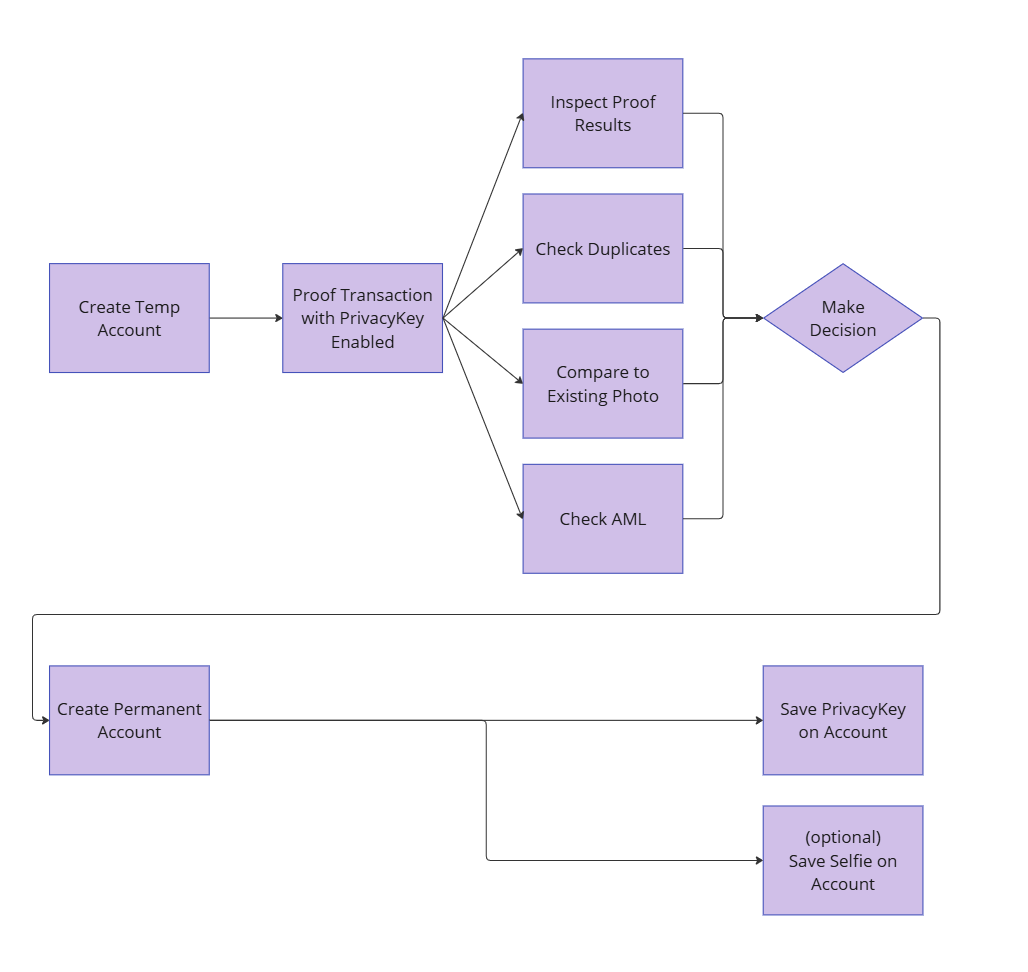
The documentation below explains how to orchestrate authID APIs to achieve this outcome.
Obtaining Decision Datapoints using Temporary Account
Privacy Key as part of IDVThe option to generate a user's Privacy Key during Proof must be enabled in the configuration. Please contact authID support to request this configuration change.
- Create Temporary Account as described in Create an User Account\
- Decision Datapoint - Proof
Run Proof transaction and obtain the results, the sequence is a standard authID workflow.- Create Proof Transaction
- Display the Proof User Interface
- Obtain and inspect Proof Results to make a decision.
- (Optional) Cache TempId for future use. The TempId is a unique identifier of the data object temporary storing the Proof results. It is available in Proof Results output in the
Payload.Idkey. - (Optional) Cache live user image (Selfie) for future use. Selfie is available as part of Proof Results in the following key
Payload.Data.CurrentFacialImage.Dataas the base64-encoded jpeg.\
- Decision Datapoint - 1:N
Run Duplicate Record Search.- Option 1: Privacy Key Search. Not yet available, follows the same pattern as Identify API below.
- Option 2: Traditional Biometric Search is available by using Identify API endpoint of duplicate identity check service. It can be done by providing Proof Transaction (Operation) Id as an input to the Identify API. This option is available only if traditional biometric credential is enrolled for Account.\
- Decision Datapoint - Existing Biometric Data
Compare a live Selfie to a previously available facial image of the user, for example corporate HR record.
Use Verify Document Owner endpoint and provide 2 inputs:- Existing User Image from your records
- Live Selfie cached from Proof Results
The output contains the comparison results of two facial images, complete with match score.
Enroll Privacy Key Permanent Account
All decision datapoints above can be considered optional. If all required criteria are met, permanent account can be created.
- Create Permanent Account
- Enroll Privacy Key as Account Credential using Create Proofed Account Credential endpoint.
The Privacy Key contained in TempId is deposited as root-of-trust credential into the Permanent Account. The audit trail shows the link between underlying Proof transaction and the corresponding Account credential.This action enables Privacy Key Verification workflow, and adds the Privacy Key to tenant's Privacy Key Deduplication Service search space.\curl \ --location 'https://id.authid.ai/IDCompleteBackendEngine/Default/AdministrationServiceRest/accounts/{AccountNumber}/proofedBioCredential' \ --header 'Content-Type: application/json' \ --header 'Authorization: Bearer eyJhbGcI4Qj...' \ --data '{ "TempId":"3b7868ba-c945-49e7-ab51-fce63d63c103" }'
Proof Results ExpireProof results contained in TempId expire within 72 hours. Trying to enroll Account Privacy Key using TempId that has data removed results in error.
authID offers a service for longer term storage of Proof Results data, please contact [email protected] for details.
- (Optional) Add Selfie as traditional Account Biometric Credential. This enables traditional biometric Duplicate Check service with visual audit trails.
Save Selfie as Account Credential using previously cached live user image from Proof in the Create Account Biometric Credential endpoint.
Updated 3 months ago